HONKBOARD

Soundboard · Stream Deck · Voice changer · for Windows

The soundboard that runs your Stream Deck.

Play sounds into your mic, bend them live, clip the moment that just happened, and drive every key on your Stream Deck from one app. No Elgato app running in the background.

HonkBoard's built-in example layout on a Stream Deck XL. Every new install gets one for its deck.

Find, edit, put it on a key

From sound site to Stream Deck key.

Search the web, capture a sound, trim it and put it on your Stream Deck without leaving HonkBoard. No need to open a separate browser, file explorer, audio editor, or the Elgato app. HonkBoard revolutionizes your soundboard workflow by putting it all in one powerful app.

  1. 1

    Search and capture.

    Search from HonkBoard's built-in browser. Sounds a page plays show up under Captured sounds, and one click adds them to your library. Or paste a link and keep just the seconds you want.

    Only add audio you have the right to use.
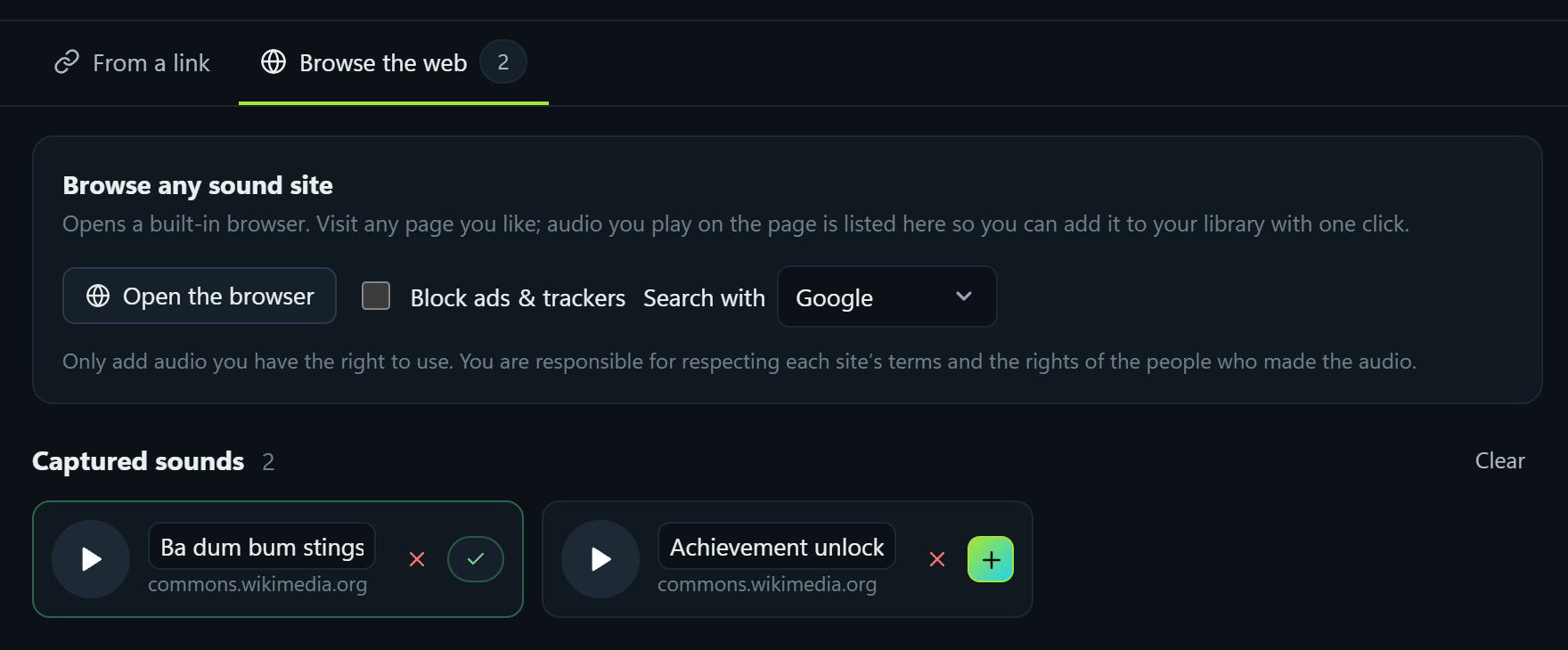
    Find sounds: the Browse the web tab with two captured sounds, one already added to the library
  2. 2

    Trim and tune it.

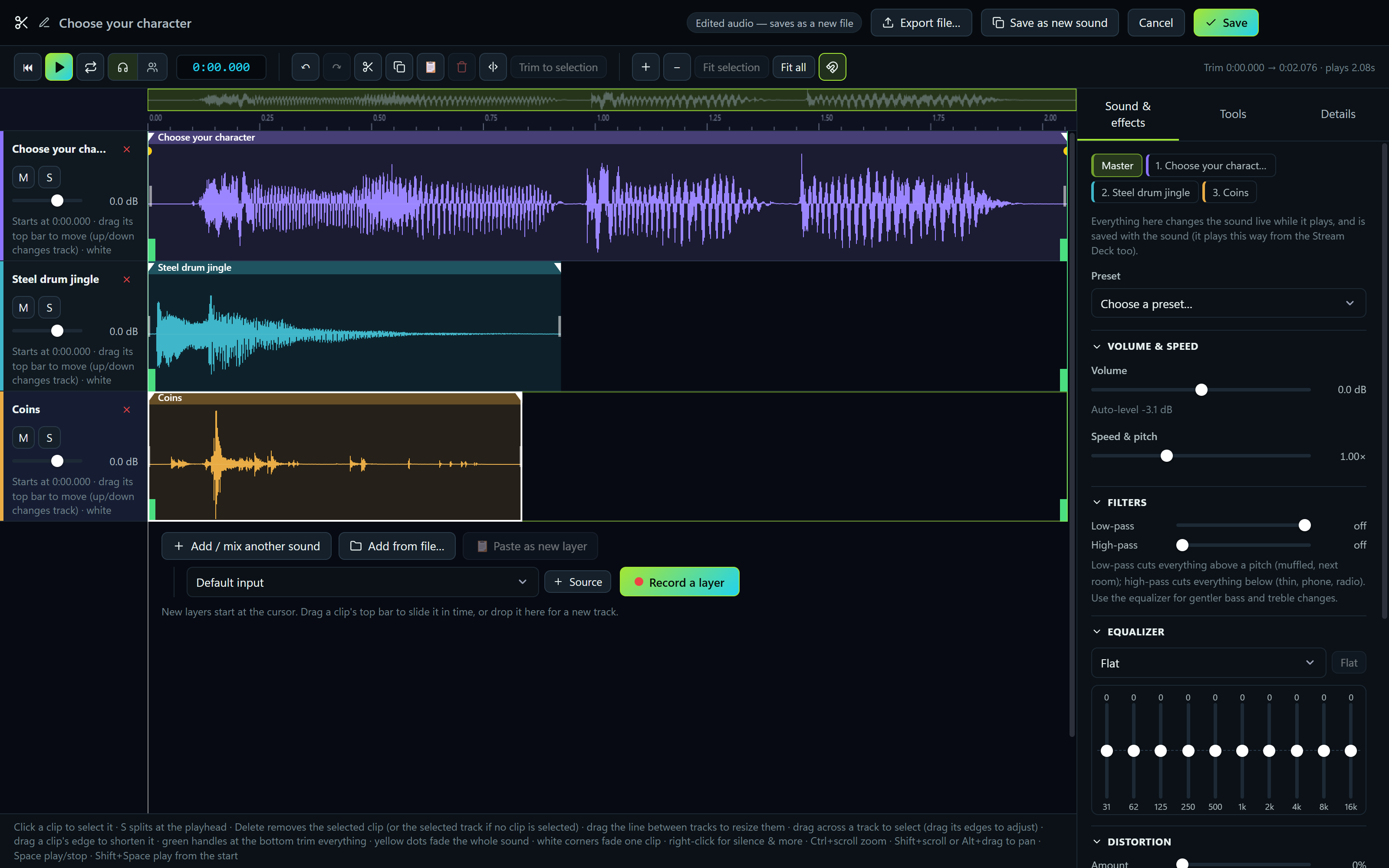
    The new sound opens straight in the editor. Trim it, fade it, layer in another sound or record over it, add effects, then save.
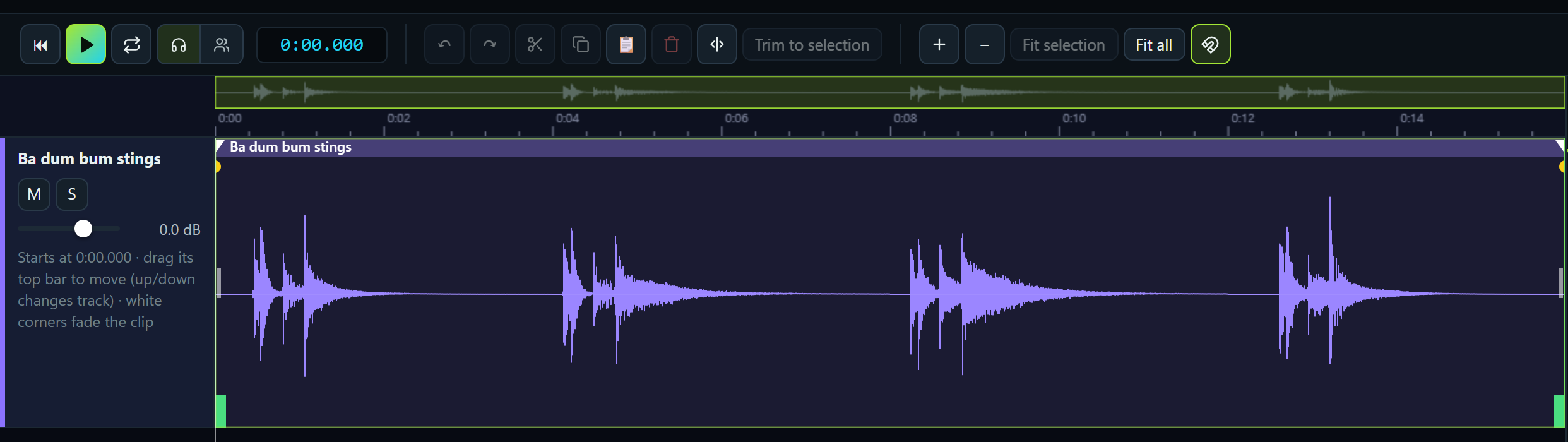
    The editor open on the newly added sound, showing its waveform and editing tools
  3. 3

    Drop it on a key.

    Drag it from the list onto your deck. The key picks up the sound's emoji and color and is live on the Stream Deck right away.

    The new Ba dum bum stings key, with a drum emoji, on the Stream Deck layout

Performance

Under a third of the memory.
vs. the Elgato app + Soundpad.

We ran the Elgato Stream Deck app and Soundpad side by side, then HonkBoard on its own, each driving the same two Stream Deck XLs on the same PC, and measured every process each one started.

Memory at idle MB, lower is better
Elgato app + Soundpad649
HonkBoard193
Processes at idle lower is better
Elgato app + Soundpad35
HonkBoard6

Measured October 15, 2026 at idle on a Ryzen 7 5800X3D (16 threads) with 32 GB, Windows 11, each app driving the same two Stream Deck XLs. Memory is private working set (Task Manager's "Memory"), averaged over 90 seconds. HonkBoard was at 197 MB with mic mixing on.

Live FX

Bend any sound while it plays.

Pitch, speed, distortion and wobble, live, on everything that's playing. Drag a slider and let go: auto-center snaps it straight back to normal.

  • Auto-center per slider, so a quick pitch drop is one flick.
  • Glide from instant to very slow, so changes swoop instead of jumping.
  • On a key or a dial: hold a key for chipmunk, turn a Stream Deck+ dial for pitch.

HonkPlayer & Now Playing

Steer it while it plays.

Every playing sound gets its own card: drag to seek, click the time to start over, turn just that sound up or down. The queue crossfades like a DJ set, and you can reorder it or set each sound's volume before it starts.

  • HonkPlayer puts it all in its own window. Pin it on top so it stays over your game.
  • Play a whole category in order or shuffled, with up to 12 seconds of crossfade.
  • Me and Others: what you hear and what your stream hears, each with its own volume, linked or not.
  • Hide what you don't need: categories, Live FX, volumes or the play mode.

Play modes

Stack them, swap them, or line them up.

Pick how a new sound behaves when something is already playing, switch with one click (or a Stream Deck key), and decide what pressing a playing sound again does.

The play mode button set to Stack Mode

Stack

Every sound plays on top of the others. Spam away.

The play mode button set to One at a Time Mode, with crossfade at 3 seconds

One at a time

A new sound replaces the last one, cutting or crossfading.

The play mode button set to Queue Mode, with crossfade at 3 seconds

Queue

New sounds wait their turn, then play back to back with a crossfade.

Crossfade up to 12 sPause & resume fadesPress again: stop, restart, or another copyPlay to Me, Others or bothKeys: play, toggle, play/pause, add to queueHold a key: loop, play while held, repeatPlay a category in order or shuffled

Instant replay & editor

Clip the moment. Keep every track.

Instant replay keeps the last stretch of your mic and desktop audio in memory. One key saves it as a sound, with each source on its own track. Then trim it, layer it, fade it, and export it however you like.

HonkBoard's editor with three layered tracks and the sound and effects panel
  • A real multi-track editor: trim, fades, gain, speed, EQ and effects.
  • Record a layer from your mic, your desktop or what others hear.
  • Export mixed, each track as its own file, or one multichannel WAV.
  • Nothing touches disk until you save: the replay lives in memory.

Phone & tablet remote

Your Stream Deck, on your phone.

Scan a QR code and your phone becomes a remote: the same keys with the same pictures, plus your whole sound library. Nothing to install, it opens in the phone's browser. Turn it sideways and the whole deck fits the screen.

Text to speech

Natural AI voices, running on your PC.

Type it, press Enter, and HonkBoard says it into your mic like any other sound. The optional natural voices (28 English voices, a one-time 350 MB download) run right on your computer: no account, and your text never leaves your PC.

  • A type-and-say box that pops up over your game.
  • From a key or a hotkey, each with its own voice, speed and who hears it.

Quick search

Type it, hit Enter, it plays.

One hotkey pops up a search box over whatever you're doing. Start typing a sound's name and press Enter. Ctrl+Enter plays it only to you; Shift+Enter keeps the box open for the next one.

Switching is easy

Bring your Soundpad library in one click.

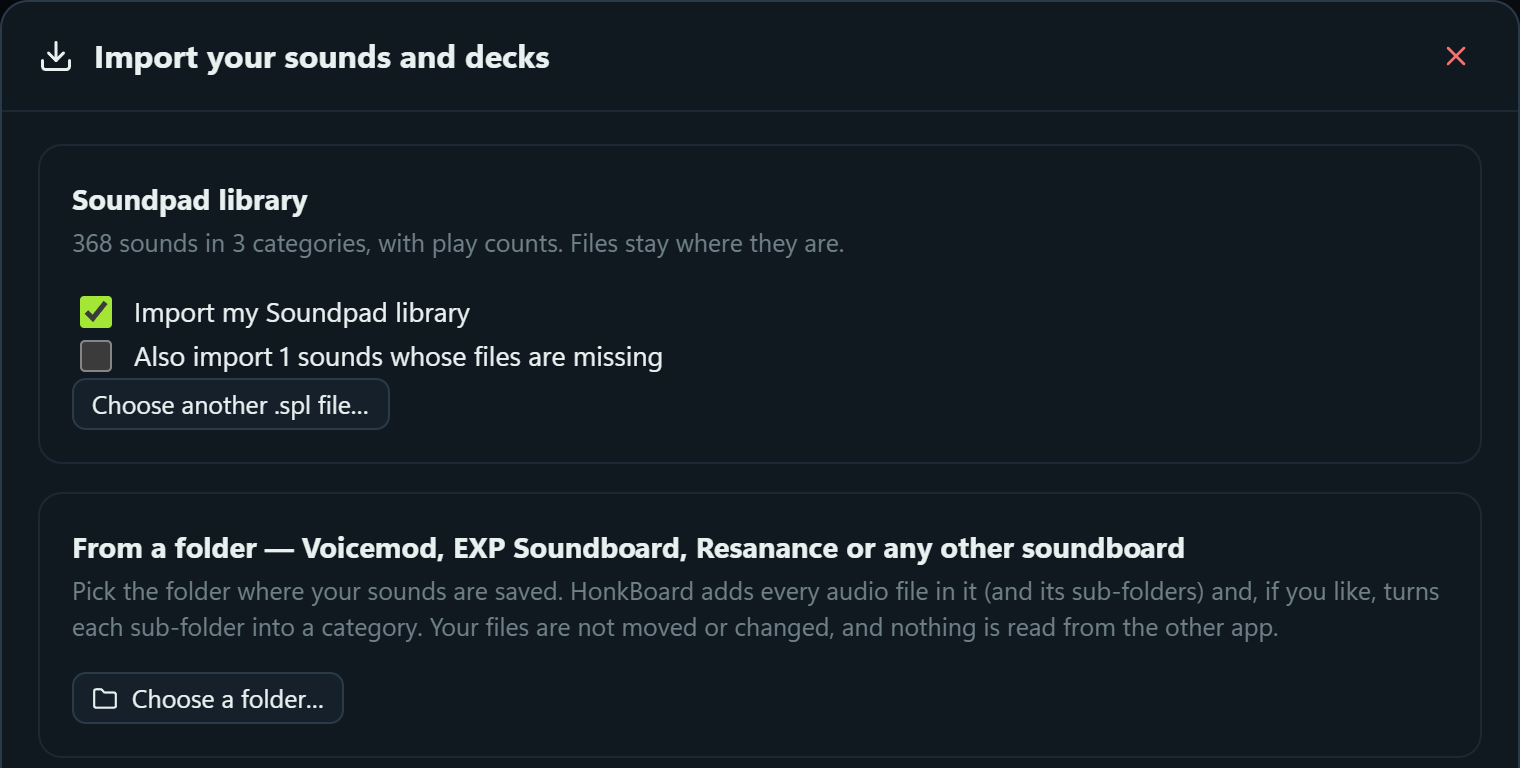
HonkBoard finds your Soundpad library and brings every sound across, with its categories and play counts. Your files stay right where they are.

  • Any other soundboard too: point HonkBoard at the folder your sounds live in, and sub-folders become categories.
  • Your Stream Deck profiles come along: pages, folders, keys, hotkeys and multi-actions.
The import window: a Soundpad library of 368 sounds in 3 categories, ready to import, and importing from any folder

Sorting rules & tidy files

A library that sorts itself.

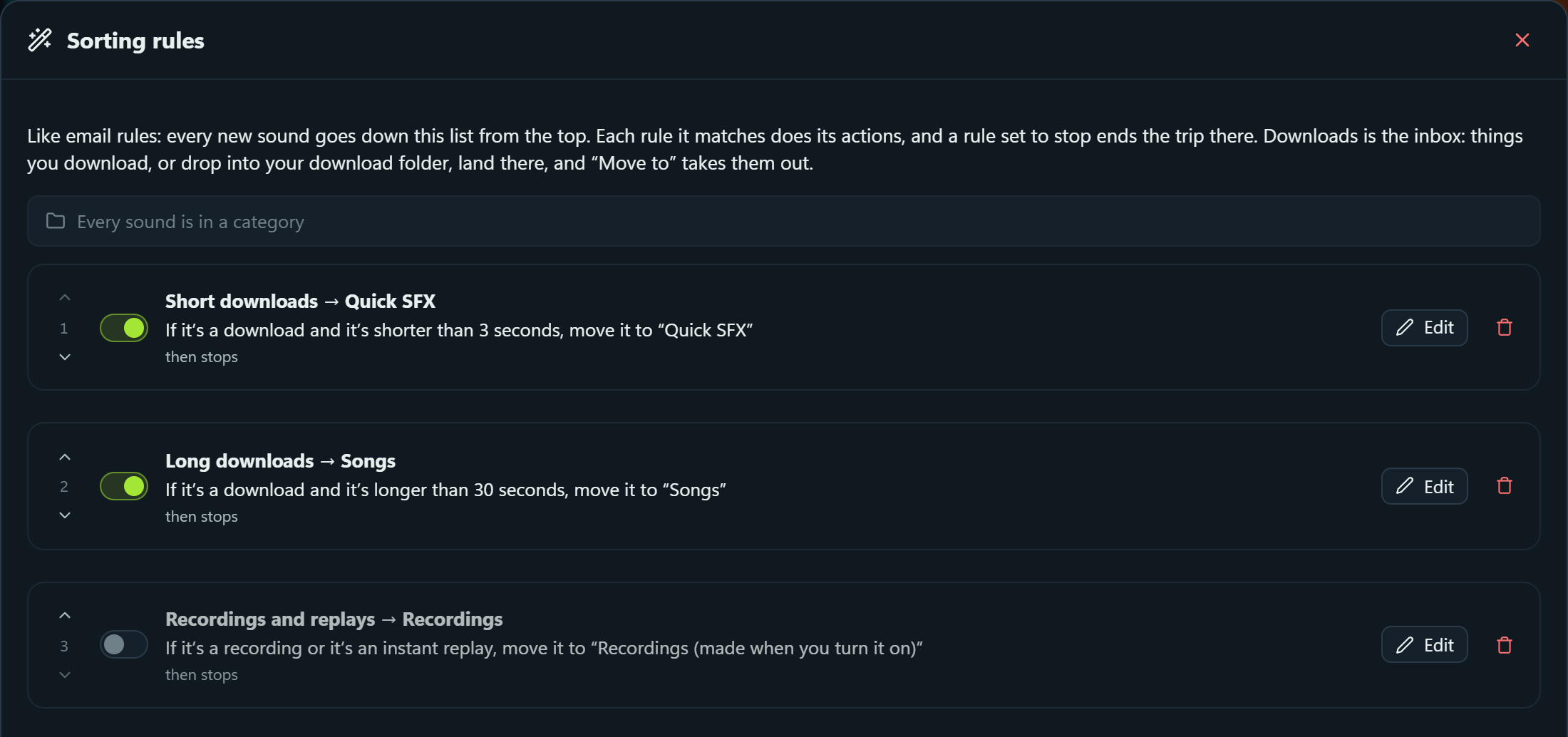
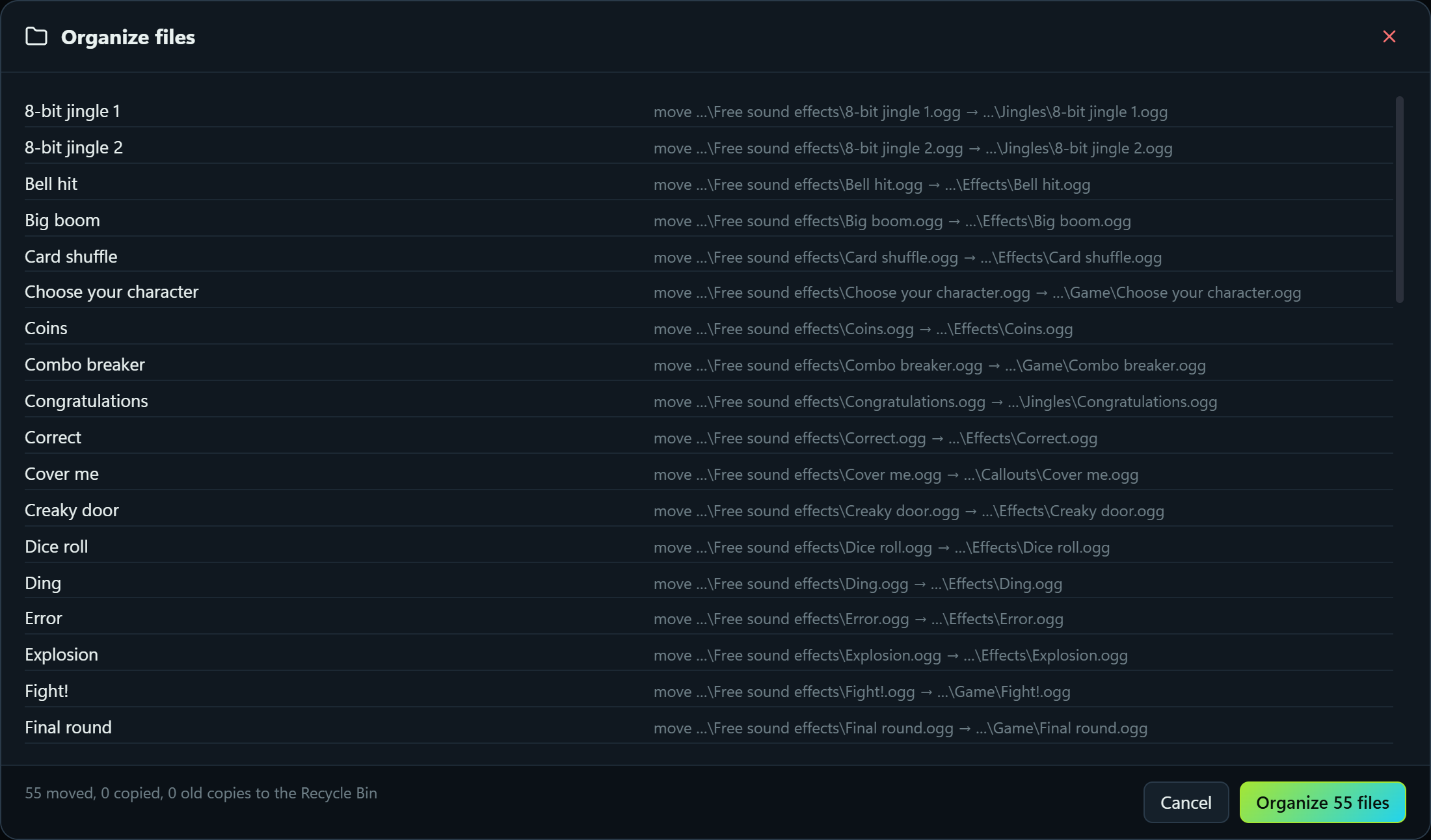
Rules work like email rules and read like sentences. New downloads land in an inbox and move where they belong. Turn on Organize files and the folders on your disk follow your categories too.

Sorting rules: three rules written as sentences, two of them switched on
Organize files: a preview of 55 sound files moving into Game, Callouts, Jingles and Effects folders to match the categories
  • Match on anything: name, length, where it came from, artist, album, genre, year, plays.
  • Suggest rules proposes a starting set from your library, and you preview before anything moves.
  • Folders match categories, sub-categories become sub-folders, with a preview first.
  • Undo, put files back, and a 90-day log: nothing is ever overwritten.

Stream Deck

Every key, every dial, set up out of the box.

HonkBoard talks to your Stream Deck over USB and draws every key itself. Plug in and you get a ready-made layout: the 55 free sounds in folders, Now Playing and Up Next keys, Live FX, the voice changer, instant replay, a multi-action, a timer and a clock. On Stream Deck+ the dials scrub, pick from the queue and set the volume of what's playing.

The example layout on a Stream Deck + XL: 36 keys and six dials
The example layout on a Stream Deck +: eight keys and four dials
The example layout on a 15-key Stream Deck
57 key actionsPages, folders, profiles that switch with your gameLong-press & double-pressMulti-actionsTime on any sound keyScreensaverUndo history that names every change

Integrations

Plays nice with the rest of your setup.

Voicemeeter

Keys that press Macro Buttons, toggle a strip or bus (mute, A1, B1…), change a volume, or run a script. Keys light up when it's on in Voicemeeter.

Stream Deck plugins Experimental

Install Stream Deck and OpenAction plugins into HonkBoard and use their keys and dials, property inspectors included. Plugins are made by others and follow their own licenses.

OBS Studio

Scenes, sources, recording, streaming and the replay buffer.

Discord

Mute, deafen and more, from a key.

NVIDIA ShadowPlay

Save a replay, record, screenshot.

Per-app audio

Send any app's sound to a different output with one press.

MIDI controllers

Pads play, knobs and faders turn like Stream Deck+ dials.

OSC

Trigger anything from other apps and devices.

Hotkeys & typing

Press keys, hold keys, type text, media keys.

Autoclicker

Left, right or middle, toggle or hold.

Voice changer

Thirty-plus voices for your mic.

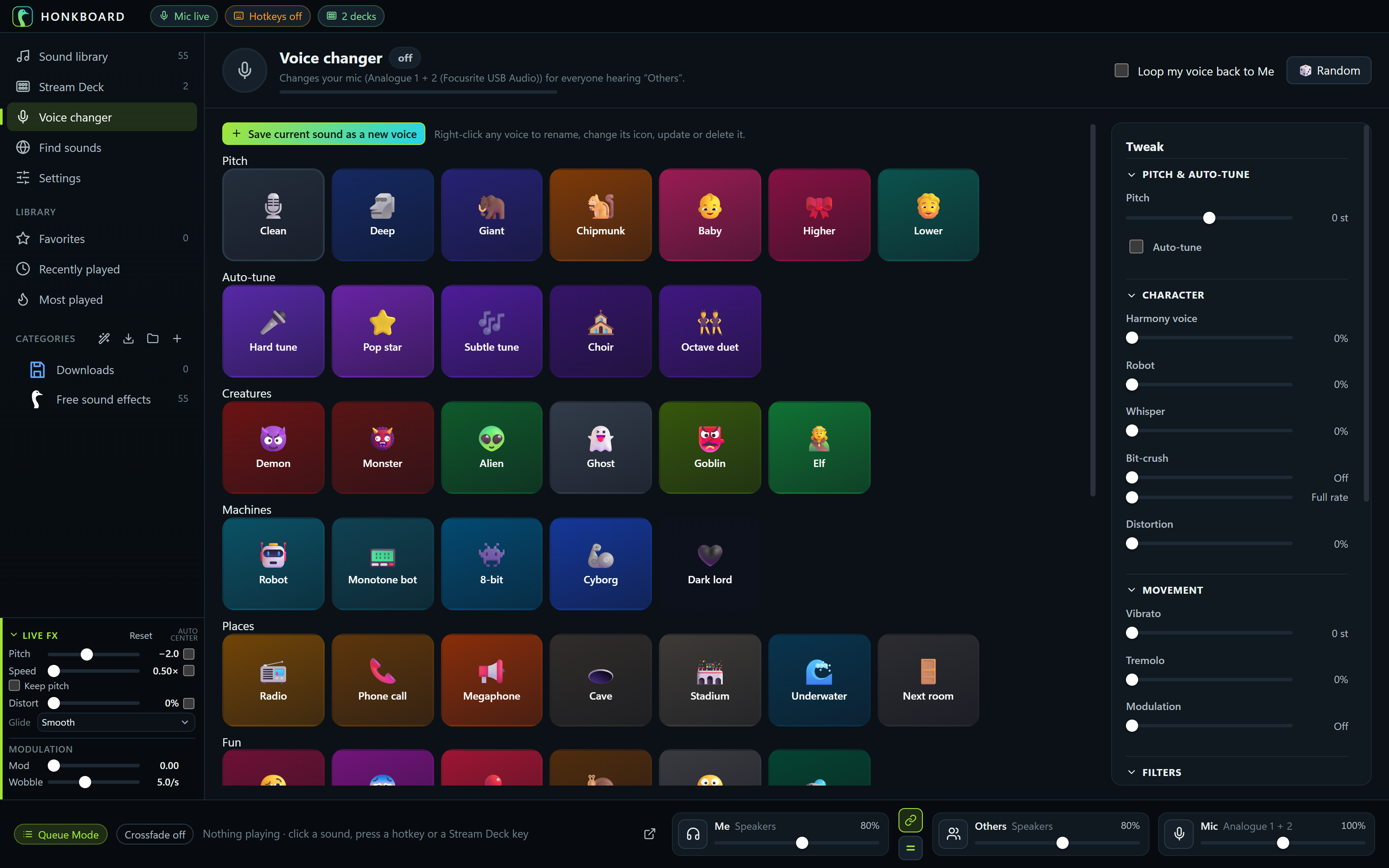
Robot, demon, chipmunk, radio, cave, hard tune and more, live on your microphone for everyone hearing Others. Tweak any of them and save your own.

The voice changer: voices grouped as Pitch, Auto-tune, Creatures, Machines and Places, with a Tweak panel

Categories & sub-categories

Categories inside categories, as deep as you like.

Drag a category onto another to tuck it inside, or between two to move it. Fold them away, give each its own color and icon, and play a parent to hear everything inside it.

  • Icons and colors on every category, from HonkBoard's icon library or your own pictures.
  • A parent plays its own sounds and everything below it, in order or shuffled.
  • Add a folder and its sub-folders become sub-categories in one go.
  • Files can follow: turn on Organize files and sub-categories become sub-folders on disk.
  • Each category remembers its view: tiles or list, size and sort.
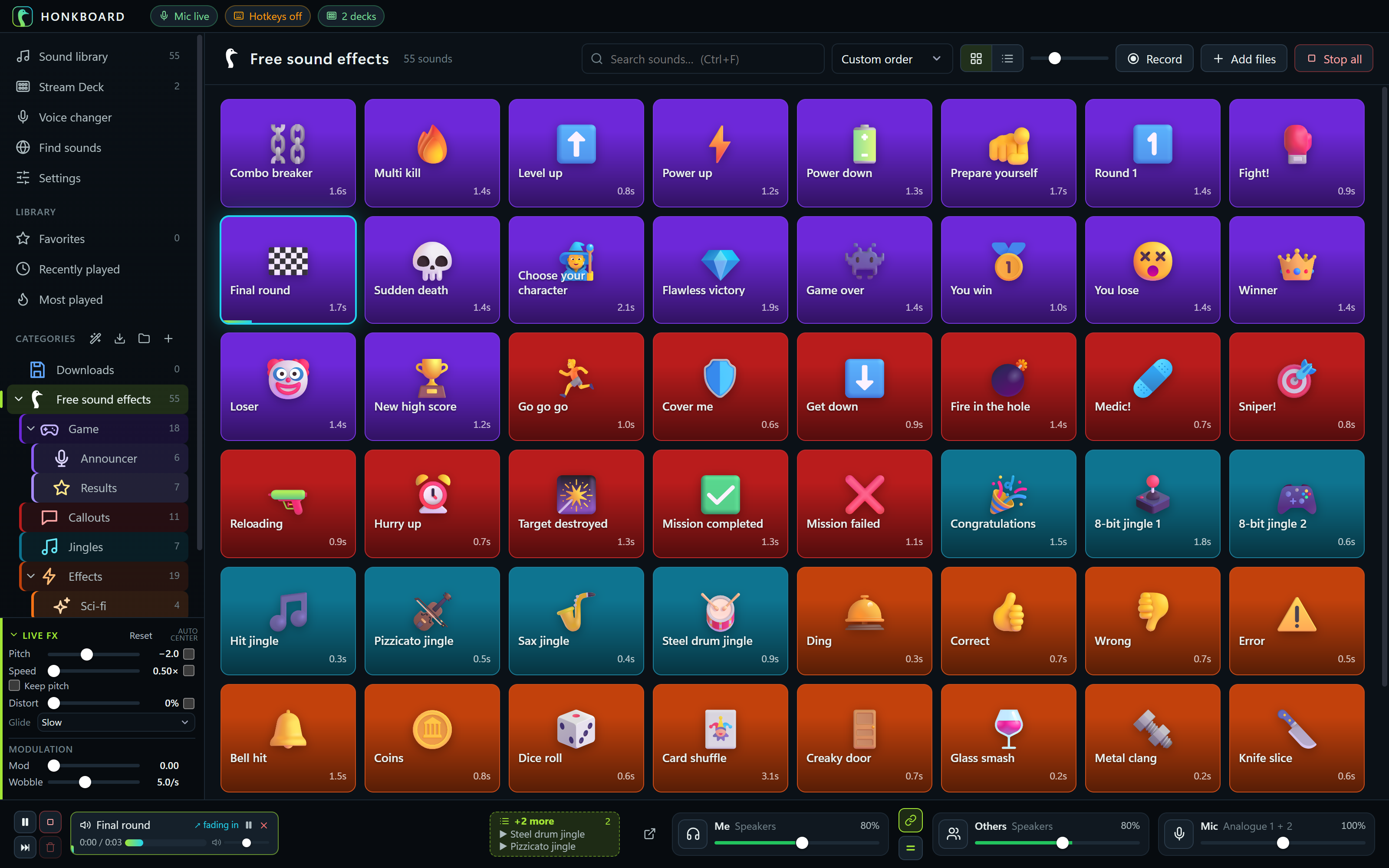
The category tree: Free sound effects holding Game (with Announcer and Results inside), Callouts, Jingles and Effects (with Sci-fi inside), each in its own color

Library

Make your library look like yours.

Colors, pictures and emoji on every sound, categories inside categories, tags and album art read from your files, and every view remembers how you like it.

The sound library: the free sound effects as colorful tiles with emoji, grouped in Game, Callouts, Jingles and Effects sub-categories

And everything else

Holds your push-to-talk

HonkBoard holds your game's talk key for exactly as long as a sound plays to others.

Ducks your other apps

Game and music volume dip while a sound plays, then come back.

Even loudness

Auto-level makes a whisper and an air horn play at about the same volume.

Profiles follow your game

Your deck switches layouts when a different app comes to the front.

Share it

Send a category, every category, or a whole deck layout with its sounds and the pictures you put on it.

55 free sounds

Announcer lines, game calls, jingles and effects, free to use anywhere (CC0), ready on day one.

Safe by default

Daily backups you can restore by day, and confirmations with counts before anything is removed.

English & Español

Every screen translated. HonkBoard follows your Windows language.

Light on your PC

Choose how often meters and progress bars update, and nothing updates while HonkBoard is minimized.